Creating an account on Reezn TV is a breeze and quite a straightforward process. Even though you can use this app as a guest user without registration, when you log in, you get several advanced features unlocked and can utilize this app to its fullest without any restrictions.
Online streaming and OTT apps usually require registration and account creation, but Reezn TV doesn’t make it a necessity, which means signup is optional, as you can access the entire content librray of this app as a guest user and use it without any major limitations to stream higher-resolution movies and shows for free. However, when you are logged in to this app, you will be able to create watchlists and get your hands on several advanced attributes.
Benefits of Creating an Account on Reezn TV
To begin with, a user with an account on Reezn TV will get personalized recommendations based on their in-app activity and watching patterns so that they can find content of the kind that fits their tastes directly on the home feed without having to search a lot. Registered users have the ability to create and manage watchlists for tracking preferred films and shows.
One can also access it on multiple devices seamlessly and enjoy their favourite content anytime, anywhere, as you can log in to the same account to get your playlist and personalized recommendations seamlessly synced across all your devices. Users obtain exclusive updates on new releases and features, enhancing the overall experience on the Reezn TV app.
How to Sign Up for a Reezn TV Account
Make sure you have the latest version of Reezn TV app installed on your device. Follow these easy steps to signup and login to this app safely.
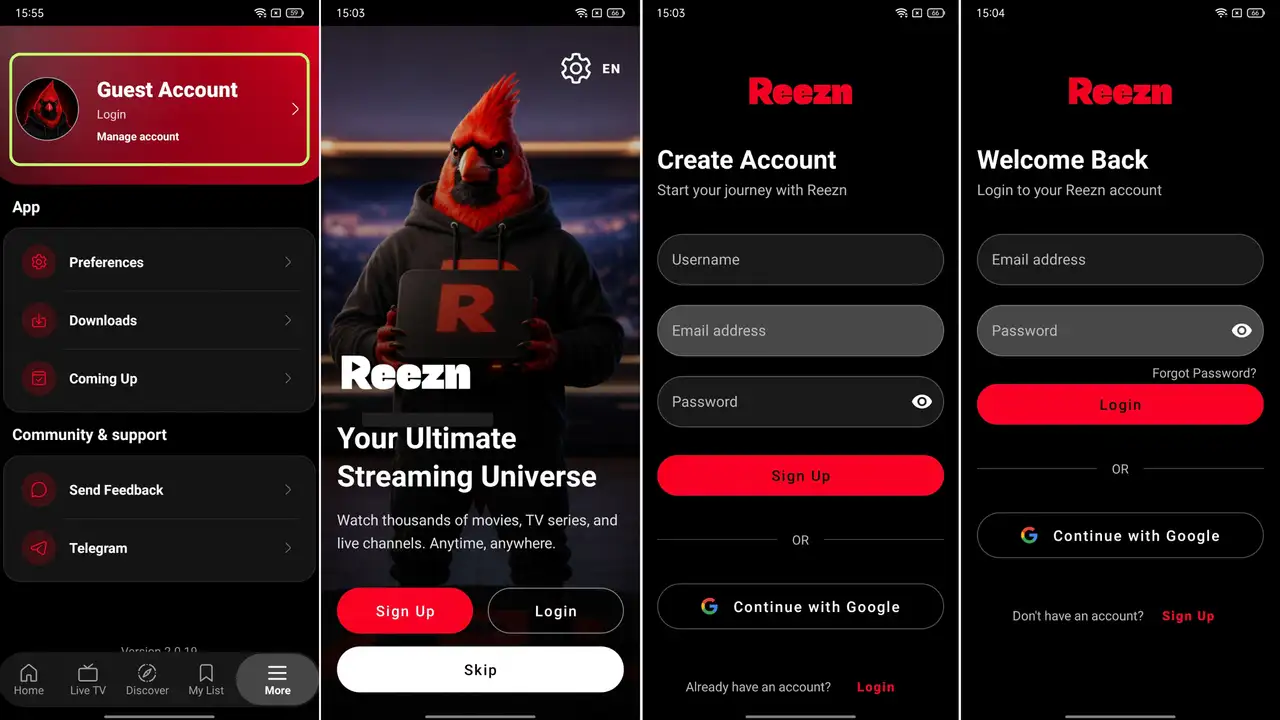
- Turn on your internet and launch the Reezn TV app.
- Click on the ‘More’ option and tap on the signup/login option at the top of the screen.
- You can use Google OAuth to sign up directly sign up via your Google account, which is more convenient and recommended method.
- Or, select the Signup option and enter your email, username, and password, then click on the ‘Signup’ button.
- Now that you have successfully created a Reezn TV account, go back to the login page.
- Enter the login details and credentials to login to this app.
Reezn TV Login Problems and Their Solutions
Incorrect Email or Password
Users may find it frustrating when they are unable to log in to Reezn TV because of mistyping the email ID or password. First, one has to verify that the email address is spelled correctly and that the password is typed in correctly, keeping in mind that capitalised and alphanumeric characters matter. If the problem still exists, users can use the “Forgot Password” option to reset their password through the email linked to their account. They can follow the instructions in the password reset email to create a new password and note it down physically in case they have a weak memory. Also, clearing the app’s cache or reinstalling the app is also a good idea, as it helps fix any glitches that might be preventing the user from logging in.
Users may get frustrated if the login option on the Reezn TV APK fails to function. The foremost remedy for this issue is to check if the user has the latest version of the app. If they continue to experience issues, they should consider clearing the cache or data of the app from their device settings. Restarting the device can also help to resolve any temporary glitches, and the user should make sure their internet connection is stable. If none of these solutions works, then one might want to try reinstalling the app or contacting Reezn TV support for further assistance.
Reezn TV Stuck on the Login Screen
If viewers happen to be stuck on the login screen of the Reezn TV app, here are some steps that they can take to address the issue. One should make sure the app has been updated to the latest version. Also, they can clear the app’s cache or data from the device settings. If it keeps happening, restarting the device can fix temporary glitches. If every attempt fails, then uninstalling the app and then reinstalling it can often fix stubborn login issues, letting users access their desired content without any problems.
It can be devastating for users if they are dealing with the “Reezn TV Account Temporarily Unavailable” problem. To solve this, one should check if there is any problem with their internet connection. Then they can try to close and reopen the Reezn TV app to refresh the session. If the same issue continues, clearing the app cache or data in the device settings should be tried out. Finally, the user can try reinstalling the app or contact Reezn TV support for further assistance to access their lost account.
FAQs
Is a Reezn TV account required to watch content?
It is not necessary to have an account in order to stream content on this app, so if you don’t want to sign up and give your personal details (email or number), you can skip that part and continue wathcing videos without having to sign up.
What should I do if I forget my Reezn TV password?
On the login page, you have an option to forget/change your password, so click on it and enter your registered username or email, and then open the email and click on the Reezn TV password change link to open the page to reset your password.
Can I use the same Reezn TV account on multiple devices?
Yes, viewers can use the same account on multiple devices, and it is quite beneficial as you can access all your personalization and watchlist across all your devices.
Is Reezn TV sign-up and login free?
Yes, the app is free to explore and stream for everyone. Creating an account does not require you to make any purchase on this platform.
Conclusion
If you want to leverage the Reezn TV app for the best viewing experience, creating an account on this platform is one of the best moves because it unlocks all the advanced features so that you can utilize it properly and enjoy an uninterrupted viewing experience. I hope you found the guide given above about the account creation process helpful. Let us know in the comments if you have any more queries regarding the sign-up and login process and requirements