Download Reezn TV For Firestick (Updated 2026) For Free
Reezn TV is all what you need for your entertainment, as it provides live sports, high-end TV series, and exclusive OTT content and whatnot. It has literally eliminated the need for having multiple subscription-based streaming platforms, as this app serves all your requirements in the best way possible. Reezn TV For Firestick is easy and safe to install via the official website (Reezntv.app).
It is a free program that supports multiple languages and provides a global content collection, including new releases of film, series, and anime titles. The app features OTT content from 20+ platforms and a dedicated section for Live TV that features premium sports and news channels. By installing Reezn TV on your Firestick device, you can enjoy unlimited access to HD and 4K movies that you can watch online, as it comes with a built-in media player requiring no additional setup or configuration.

Overview of Reezn TV For Firestick
Reezn TV is a lightweight app that provides a huge and updated library of a vast range of entertainment content without charging a dime. The app supports Fire TV devices, and its user-friendly interface delivers a top-grade user experience for watching movies and shows online. Its clean and clutter-free layout makes browsing more fun, and the app is just as hassle-free to navigate via TV remote, as all options are in handy places.
Easy Steps to Download and Install the Reezn App on a Fire TV Stick
Reezn is a subscription-free streaming app, but alas, it is a third-party platform unlike Netflix, Prime, and HBO Max, meaning that it is not officially available on the Google Play Store or other app stores. However, it can be obtained from the official website (Reezntv.app). Listed below are the steps to download and install the Reezn app on a Fire TV Stick:
Step 1: Launch the official App Store and search for the Downloader App and install it on your Fire TV.
Step 2: Navigate to Settings and go to the About section, then tap on the Build option at least 7 times until Developer Mode is enabled.
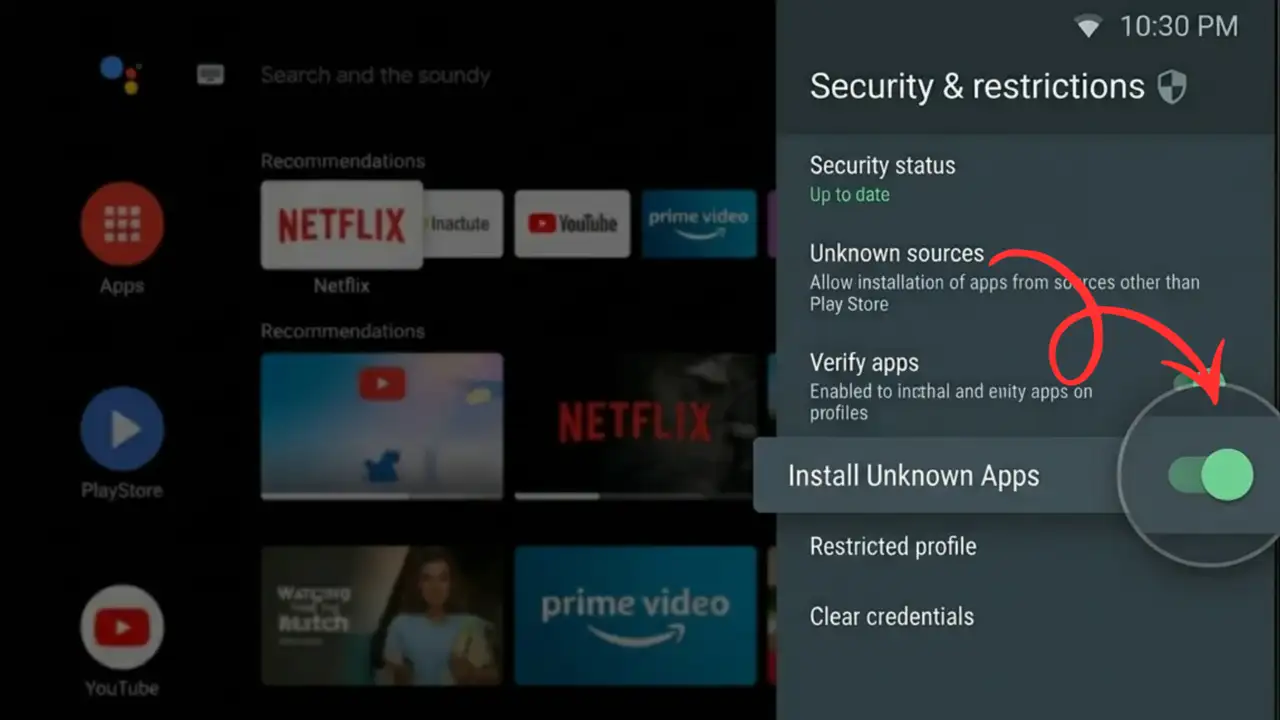
Step 3: Go back to the main settings menu and open the Developer Options, then tap on Install Unknown Apps and click on Allow to toggle it on.
Step 4: Launch the Downloader app and visit the Reezn TV website, then click on the Download button to get the APK file.
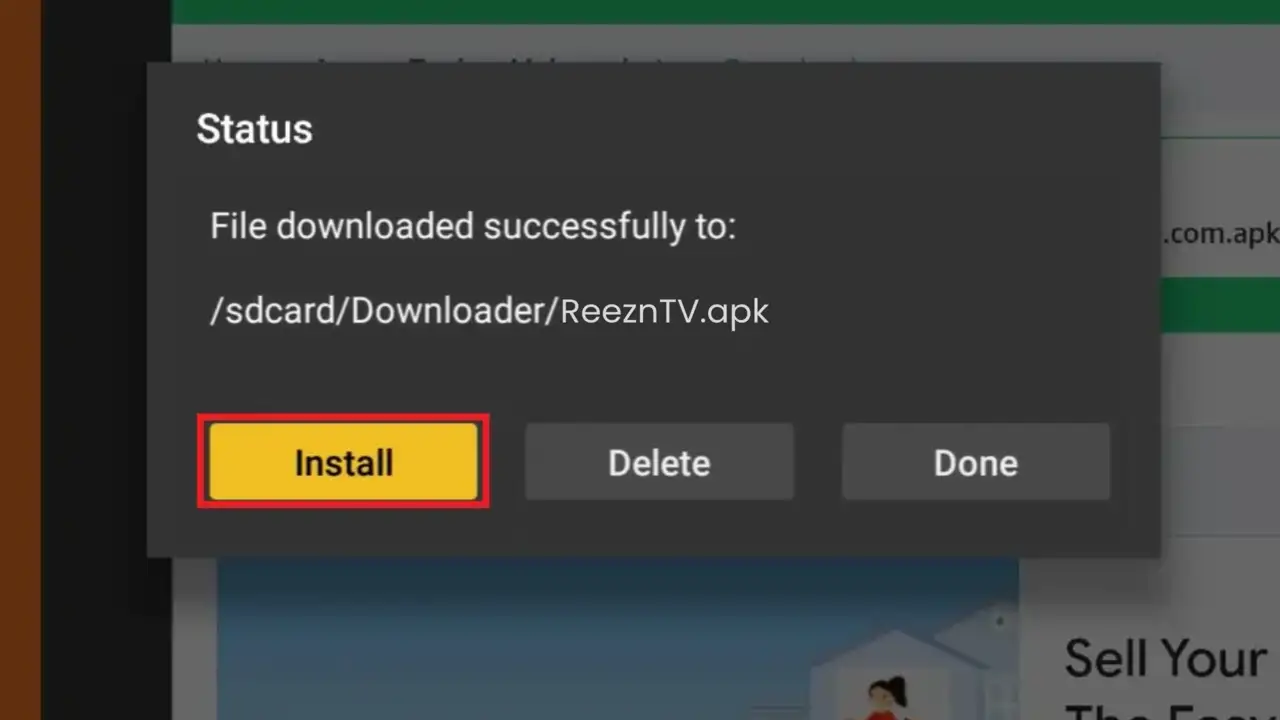
Step 5: Wait till the download is finished, then click on the Install option to initiate the app installation process. Within a few moments, the Reezn app will be installed and will be ready to use for streaming premium films and web series for free.
Benefits of Using the Reezn App on a Fire TV Device
Remote-Friendly Navigation
Reezn has a simple user interface that can be navigated using the TV remote. The app’s UI runs smoothly, especially on older TVs and devices. Using the remote, the user can surf and select the content on the screen and stream their favorite content for free. It won’t be as smooth as swiping and scrolling on a touch-sensitive screen like a smartphone, but the user can still navigate and stream the films and TV channels easily on a bigger display screen.
Large Content Library
This streaming app provides various video content to provide online entertainment to all kinds of viewers. One can expect films, television series, infotainment networks, reality shows, comedy programs, sports shows, kid-friendly content and more. A vast collection of Hollywood films, TV programs, web shows, and exclusive content from premium streaming apps. All content from high-end and other apps is available without charge in the Reezn app.
Subtitle Support
It supports more than one language within its domain so that content can reach and be discoverable for a larger audience around the globe. The page’s primary language is English. The site lets users search and find other movie theaters in the movie industry. To help them understand regional and other languages, the developers have added multiple subtitle files in Indonesian, French, Chinese, Portuguese, Spanish, etc.
Adjustable Video Resolution
Viewers can choose different video quality settings based on how strong the user’s internet connection is. People who love films and are cinephiles can rely on their connection to change the picture quality as needed. The Reezn app is a free third-party OTT platform that permits the viewer to watch films in high resolution, as HD content is more enjoyable than standard resolution or SD.
Voice Search Feature
The ‘Voice Support’ is a unique feature that enables users to give speech commands with their voice, making it easier to operate. With this feature, one can operate the device without typing and use speech to search for any content with minimal effort. It can be used for a wide range of needs, including people with disabilities or those who prefer to get things without much delay.
Compatible With Different Fire TV Devices
Reezn TV is fully compatible with a multitude of Fire TV devices, ensuring smooth streaming on various models. The app is easy to install and operate on the Fire TV Stick software, Fire TV Cube, and Fire TV Edition smart TVs. This type of compatibility enables viewers to enjoy their content without any trouble, providing a versatile streaming experience that suits their device of choice.
FAQs
Conclusion
Finding a reliable free streaming app has become a big challenge these days, as most of the good apps are blocked or unsupported for Firestick devices. Reezn TV for Firestick is the best available option for now, offering instant access to new releases and supporting various video formats, live TV, anime, and more. Users can leverage multi-server support and watch movies in higher resolution without paying any money.